
Selected work · Windows desktop prototype
AR
TableTop.
A webcam, three printed cards and a miniature neighbourhood. Explore how physical movement can bring a digital world to life.
StatusDesktop prototype · v1.0
PlatformWindows · Runs offline
FocusAugmented reality & interactive 3D
Free to try · Windows 10/11 x64
Try AR TableTop on your computer.
Version 1.0.0 · 166 MB ZIP · No account or installation required. Start in Simulation without a webcam, then try printed-card AR when you are ready.
Getting started: choose Extract All on the downloaded ZIP, open the AR Tabletop World folder and run AR Tabletop World.exe. Keep the whole folder together. The ZIP includes a start guide; printable cards are available inside the app.
This is an unsigned prototype. Windows may show an unknown-publisher or reputation warning. Review release notes and the download checksum (opens in a new tab). macOS and Linux builds are not available.
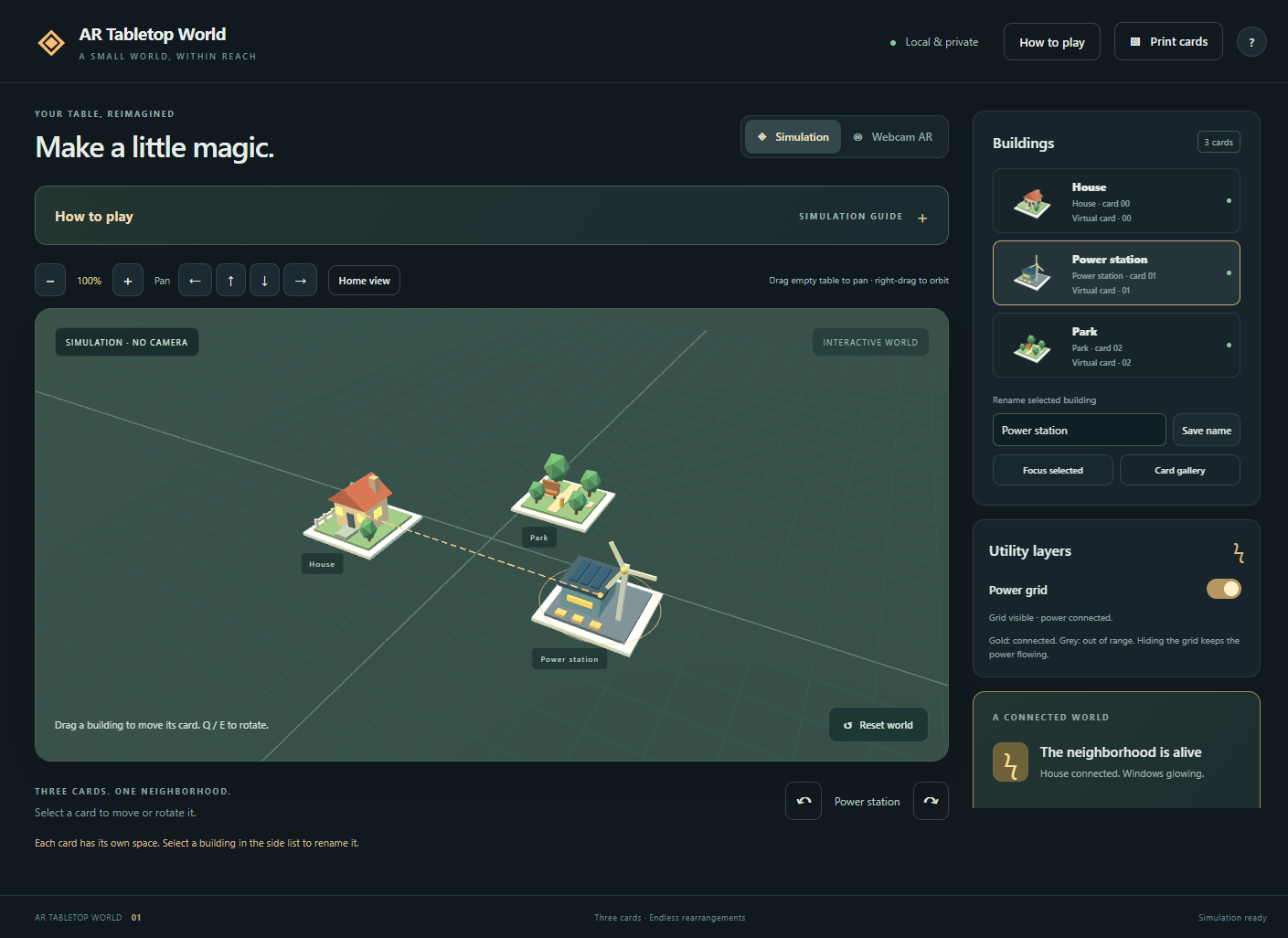 Open full-size screenshot in a new tab
A small world on your table
AR TableTop, named AR Tabletop World in the app, explores how physical cards can become controls for a digital world. A webcam recognises three printed markers and places a house, a wind-powered station and a park over them on screen.
The buildings interact: bring the station close enough to the house and its windows glow. A switchable power-grid overlay makes the connection visible.
What you can do
- Try the world immediately in Simulation mode, without a camera or printed cards.
- Move and rotate virtual cards, with overlap prevention in Simulation.
- Zoom, pan, select and rename buildings, and browse the card gallery.
- Print the included marker cards and switch to Webcam AR.
- Adjust power range and tracking settings, with preferences saved locally.
Built to explore
An experiment in playful learning, spatial interfaces and showing how a simple system works. The current world includes three buildings and one utility: power.
Technology
TypeScript · Three.js · Electron · js-aruco2 marker tracking. The building models are generated in code, and the packaged app runs locally without an account or API key.
Current stage
A working Windows prototype. Automated checks cover simulation, marker detection and desktop controls; physical printed-card tracking still needs testing under different lighting and camera setups. This uses printed markers rather than markerless room scanning.
Explore the code
The public GitHub repository includes the source, build instructions, printable marker assets and validation notes. The application code is available under the MIT licence.
Browse the AR TableTop source (opens in a new tab)