
Selected work · Windows desktop prototype
3D Hand
Workbench.
A creative 3D workspace controlled by your hands. Assemble shapes with webcam gestures and keep your scenes on your own computer.
StatusDesktop prototype · v1.2
PlatformWindows · Runs offline
FocusHand tracking & 3D interaction
Free to try · Windows 10/11 x64
Try the 3D Hand Workbench.
Version 1.2.0 · 180 MB ZIP · No account or installation required. Explore the sample scene with your mouse, then start your webcam to try the hand tools.
Getting started: choose Extract All on the downloaded ZIP, open the Gesture 3D Workbench-win32-x64 folder and run Gesture 3D Workbench.exe. Keep the whole folder together. A start guide and hand-controls guide are included.
This is an unsigned prototype. Windows may show an unknown-publisher or reputation warning. Review release notes and the download checksum (opens in a new tab). macOS and Linux builds are not available.
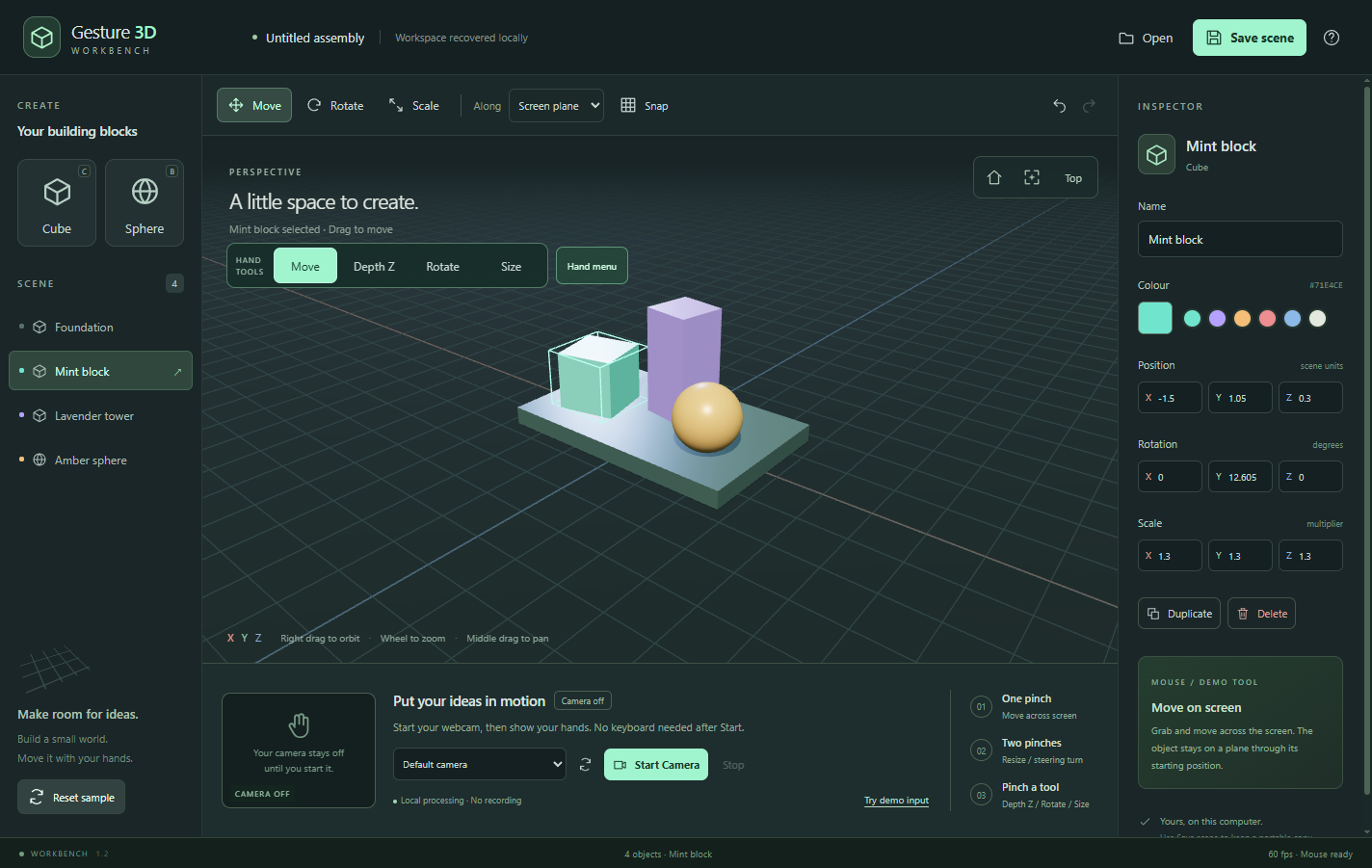 Open full-size screenshot in a new tab
Build with your hands
The 3D Hand Workbench, named Gesture 3D Workbench in the app, explores a more direct way to assemble a 3D scene. An ordinary webcam tracks your hands so you can pinch to grab a shape, move it and place it in the workspace.
Separate Move, Depth Z, Rotate and Size tools make each action explicit. Mouse and keyboard controls remain available for editing and navigating the scene.
What you can do
- Create, duplicate, rename and colour cubes and spheres.
- Move, rotate and resize shapes with one- and two-hand gestures.
- Adjust depth independently with the Depth Z tool.
- Use a pinch-operated menu for scene tools, views and undo/redo.
- Save scenes on your computer and open portable scene files.
- Orbit, pan, zoom and edit values in the object inspector.
A different creative interface
A prototype for exploring hand-controlled design and simple 3D assembly. It works with a standard webcam and does not need a headset or specialist controllers.
Technology
TypeScript · Three.js · Electron · MediaPipe hand tracking. The tracking model is bundled with the app, so processing and scene storage stay on the computer. Camera access starts only when requested; webcam video is not recorded or transmitted.
Current stage
Version 1.2 includes dedicated hand tools and improved handling of brief tracking loss. Automated tests use recorded images and simulated gestures; the updated controls still need a live human usability session. Clear lighting and visible hands matter. This is a creative workbench, not precision CAD.
Explore the code
The public GitHub repository includes the source, build instructions, local tracking model and validation notes. The application code is available under the MIT licence, with separate notices for bundled components.
Browse the workbench source (opens in a new tab)